
Bud Builders - Making Friends, Growing Cannabis

Register a free account today to become a Bud Builders member! Once signed in, you'll be able to participate on our site by adding your own topics and posts, as well as connect with other members through your own private inbox.

Join the fun and make some friends!

Site Update and Logins - please read

Stoneyluv

Outlaw
Staff member
Bud Builders Supporter
Joined
Apr 19, 2023
Messages
6,079
Reaction score
30,642
Hello BudBuilders!!!

We are currently preparing to perform a forum update to the latest software. There will be some new features and some slight changes within the styles and themes. i will post all the new changes and features later once we have it all together. we are skipping an update we never had done last year so we are upgrading two versions at once so there are a few differences. hopefully they will be improvements and not confuse any of us.

one change i am aware of is the dark theme will no longer be a theme entity by itself. when we bought the upgrade the illuminate theme now included the dark as a setting not a theme itself. so those of us that use illuminate dark you may see the default theme when you first log on after the update. please don't freak out we will have a dark theme... carbon looks to have a light and dark too so we might have some extra options there, i'm not entirely sure till i see it, i just know i bought them both. there are only nine to choose from and those two still looked the coolest to me.

.

also i know we are still having some email issues within our server so just to keep anything from locking up i have turned off two-form authentication for now. after the update we will revisit this decision and will probably just make it a personal option for those that want to keep using it. just for now though your username and password is enough security for me. if anyone feels naked without it for a few days then please just let me know i will turn it on for anyone that would like. it's a quick setting..

so fire away with any questions or concerns you may have and i will of course update you once we have all the pieces aligned and have an actual update day and time scheduled for the software update.

Thank you all!!!!!!!
 
You have a way to rollback if issues pop up?

I use dark theme and on an old iPhone so I’ll probably notice a change.

When’s the scheduled rollout?
 
Multi select photos would be nice.. one at a time takes a while..
 
You have a way to rollback if issues pop up?

sure, we have backups.. it's included in our server rental.

I use dark theme and on an old iPhone so I’ll probably notice a change.

same here man, i expect it to look different the first time. i will try them all out and check all the different options and let you guys know what i find.. we'll probably do an open lesson where anyone can post a new feature the found or something like that..

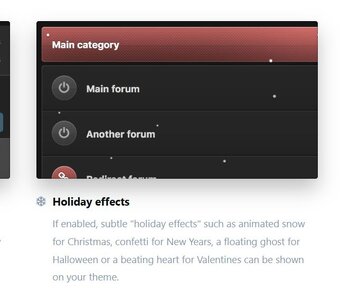
not sure i should open my mouth on this one but... the new carbon allows for us to make the forum snow!!! this is wrong on so many levels!! haha

Capture.JPG

i think maybe us having multiple themes is out of the ordinary.. we'll see how they look and maybe come september we'll renew just the popular one. and yes they make you renew and pay every six months.. can't even get the theme for a year!

When’s the scheduled rollout?

not sure man, soon... for quality assurance i am NOT performing the update!!! i have hired help and will be the guy handing tools under the car for this first time.

i;'ve learned so much about managing a website in the past few months!! i thought managing the forum would be the tough part. HA! not even close!!

just as soon as we have all the files ready we will schedule it in. i will give as much of heads up as i can. but there is a possibility i come back and say welp the upgrade is already done. no heads up!!! hahahaha we will see... still learning!!

Multi select photos would be nice.. one at a time takes a while..

we do have a multiple select...

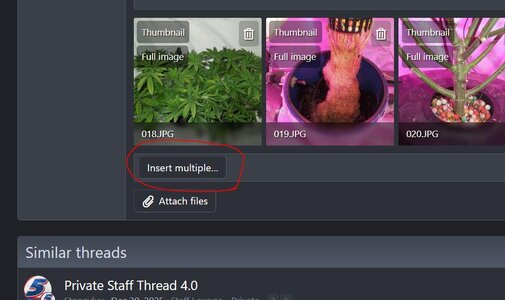
once all your photos are in the uploader then click "insert multiple" ...

Captureim.JPG

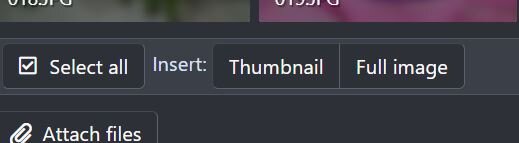
once you click insert multiple a menu comes up allowing you to choose select all and the size, pick what size you want and all the photos are loaded to the post at once.

Capturesa.JPG

i'm not sure what our max number of photos attached is but if you run into an error there let me know and i can make that number bigger. i think it's like 25 or something.. it's just a quick setting on my end though.

so give that a try and let me know if you have any problems with it. i'm happy to help further if needed.
 
Just make sure you have full backups (that can be recovered -- having backups and recovering with backups are very different), and a full rollback plan. The multi-day certificate issue was an inconvenience. Data loss is your biggest risk here. Plan accordingly, test (if you can) before you roll out directly, and expect the worst to happen that way you're relieved when it runs smoothly.
 
Just make sure you have full backups (that can be recovered -- having backups and recovering with backups are very different), and a full rollback plan. The multi-day certificate issue was an inconvenience. Data loss is your biggest risk here. Plan accordingly, test (if you can) before you roll out directly, and expect the worst to happen that way you're relieved when it runs smoothly.
That sounds like someone that has worked in IT for years.
 
Just make sure you have full backups (that can be recovered -- having backups and recovering with backups are very different), and a full rollback plan.

yes sir, i'm a big believer in having the actual files saved on another independent drive and not use some compiled file from a program if thats what you're speaking of.

The multi-day certificate issue was an inconvenience.

i apologize for that man, i'm learning more and more all the time. i just assumed that SSL was something on me and here it was on our service we rent our server space from. i just didn't tell him soon enough thinking it was my doing for a couple days. and then in the same weekend our email server got screwed up, a tiny bit by me trying to fix the ssl and a whole bunch from previous demons that resurfaced.

i know this email thing is a real PITA for you guys. every time i see an error i search the address in our server and if it comes back to a member i have just been verifying that the account is valid with no 2FA and not waiting for an email. as for the spammers i just manually sift those out for now. i will say without the email server sending back we get a lot less spam!!

i'm sorry things are jenky right now but i promise we will get it resolved soon.
 
our site maintenance is scheduled for it's upgrade this thursday night into friday morning. we performed one of the two upgrades a couple weeks ago and everything went well so this thursday night i will upgrade to the final latest version and will also require two additional addon upgrade to the search and to the media gallery.

i hope to have everything back up and running by early morning on friday May 1st. i will make a post here once everything is finished.

Thank you all for your support and patience!!!!!!
 
our email is now working through our server. i apologize for any inconvenience i know some of you use it as notifications and it hasn't been working correctly since we updated the SSL.

so if anyone would like to turn their 2-FA back on you can now get sent a code. if anyone has any issues please let me know.
 
Hello BudBuilders!!!

We are currently preparing to perform a forum update to the latest software. There will be some new features and some slight changes within the styles and themes. i will post all the new changes and features later once we have it all together. we are skipping an update we never had done last year so we are upgrading two versions at once so there are a few differences. hopefully they will be improvements and not confuse any of us.

one change i am aware of is the dark theme will no longer be a theme entity by itself. when we bought the upgrade the illuminate theme now included the dark as a setting not a theme itself. so those of us that use illuminate dark you may see the default theme when you first log on after the update. please don't freak out we will have a dark theme... carbon looks to have a light and dark too so we might have some extra options there, i'm not entirely sure till i see it, i just know i bought them both. there are only nine to choose from and those two still looked the coolest to me.

.

also i know we are still having some email issues within our server so just to keep anything from locking up i have turned off two-form authentication for now. after the update we will revisit this decision and will probably just make it a personal option for those that want to keep using it. just for now though your username and password is enough security for me. if anyone feels naked without it for a few days then please just let me know i will turn it on for anyone that would like. it's a quick setting..

so fire away with any questions or concerns you may have and i will of course update you once we have all the pieces aligned and have an actual update day and time scheduled for the software update.

Thank you all!!!!!!!
I love that being turned off! For the first time in absolute months, I was able to just log in!
 
I love that being turned off! For the first time in absolute months, I was able to just log in!

i know you always hated it. yours was the very first one i turned off . i had to manually switch it off on each person. so when somebody would try to login i would get an error on the server. i'd then go in and turn it off for that person. over the past month i can't tell ya how many i did.. lots!! haha i think maybe the only two left with it on are myself and Moe, maybe a couple other older members i'm not sure.
 
Im having major problem uploading pictures.. when will multiple selection be available
@Stoneyluv
You still having probs? I was able to upload several without incident. I think we may have a handle on what’s going on. For some reason, it’s asking me to approve the uploads and if I’m not here that’s not being done. No one knows why but it’s being worked on. In the future if this happens hit me up on FB and give me a heads up.
 
@B2ACG & @CannaGranny , as soon as i'm done with the update stuff this is my very next priority to finally figure this one out and get it changed. I've tried a while back to turn off that stupid approval thing that B2 always has to go through. it compiling notices to Granny for every single photo is just mind blowing to me. it has to have something to do with the seed vendor status, you tow are the only two members in that club and there has to be some stupid setting hidden somehow.. i scoured the settings the other night for a few hours and absolutely noting looked off.. a couple tiny things here and there that i cleaned up but nothing that would say require approval like this.

i'll dig into again this weekend and make a fake member and join that seed vendor cub with you two and see if i can't make it fail for me. and if i still can't figure it out i'll take it to the masses and ask the forum for our forums software... yeah, theres a forum for forums!!! hehe

@B2ACG , as far as the multi attachment thing it has always been available since i joined this site so i'll find a video i recently made showing how to upload with android 15.. (i think thats the latest anyhow although i could be wrong).. i remember you telling me you had a newer phone so i assume it's using the latest..

i'll make a new one in fact and use your actual thread with your uploaded photos to show you how to post them all with two clicks. and then if you want to practice or something we can and even post test posts and i'll delete them when we're done. nothing like learning by actually doing it versus reading about it...
 
@B2ACG & @CannaGranny , as soon as i'm done with the update stuff this is my very next priority to finally figure this one out and get it changed. I've tried a while back to turn off that stupid approval thing that B2 always has to go through. it compiling notices to Granny for every single photo is just mind blowing to me. it has to have something to do with the seed vendor status, you tow are the only two members in that club and there has to be some stupid setting hidden somehow.. i scoured the settings the other night for a few hours and absolutely noting looked off.. a couple tiny things here and there that i cleaned up but nothing that would say require approval like this.

i'll dig into again this weekend and make a fake member and join that seed vendor cub with you two and see if i can't make it fail for me. and if i still can't figure it out i'll take it to the masses and ask the forum for our forums software... yeah, theres a forum for forums!!! hehe

@B2ACG , as far as the multi attachment thing it has always been available since i joined this site so i'll find a video i recently made showing how to upload with android 15.. (i think thats the latest anyhow although i could be wrong).. i remember you telling me you had a newer phone so i assume it's using the latest..

i'll make a new one in fact and use your actual thread with your uploaded photos to show you how to post them all with two clicks. and then if you want to practice or something we can and even post test posts and i'll delete them when we're done. nothing like learning by actually doing it versus reading about it...
Yeah man.. send it over..
 
try out the new skins guys. they're labeled as carbon 2 and illuminate 2... both are totally work in progress but i kinda like the new carbon better.. both of them now have light and dark built in.

don't worry i'll turn off the annoying confetti... just on for now!! hahaha but in the mean time you guys can custom turn it off under the customize button. there is also some choices in backgrounds.

Capturey.JPG

tell me what you guys think??

i was trying to make them look exactly like the other ones and i'm not so sure thats a good idea maybe we make them look a little fresh and new.
 
Last edited:
try out the new skins guys. they're labeled as carbon 2 and illuminate 2... both are totally work in progress but i kinda like the new carbon better.. both of them now have light and dark built in.

don't worry i'll turn off the annoying confetti... just on for now!! hahaha but in the mean time you guys can custom turn it off under the customize button. there is also some choices in backgrounds.

View attachment 129145

tell me what you guys think??

i was trying to make them look exactly like the other ones and i'm not so sure thats a good idea maybe we make them look a little fresh and new.
Using the Carbon 2 now. So far so good.
 
the biggest ask and complaint about the carbon is it cannot sticky the navigation bar, only the top bar. everyone that askes for it they direct to illuminate. i switched to illuminate and now have that one on. the original skins we had still work just as they did with no errors or anything so i'll just leave them there for those that still like it. i'm so used to illuminate dark that it's tough to change. i think somebody custom made that dark theme for us because is lacking 75% of the custom fields that the other have.. if only that theme had the fluid width option i'd never change.

i'll keep shaping them as we go.

before i never understood why our button choices and layout changed along with the themes and also the look of the logo.. its because its kinda made to be that way.. i'll play around with colors and borders and stuff and see what looks the best. i never did like the orange on illuminate so i made it green.. i'm down for any suggestions!!!!
 
the biggest ask and complaint about the carbon is it cannot sticky the navigation bar, only the top bar. everyone that askes for it they direct to illuminate. i switched to illuminate and now have that one on. the original skins we had still work just as they did with no errors or anything so i'll just leave them there for those that still like it. i'm so used to illuminate dark that it's tough to change. i think somebody custom made that dark theme for us because is lacking 75% of the custom fields that the other have.. if only that theme had the fluid width option i'd never change.

i'll keep shaping them as we go.

before i never understood why our button choices and layout changed along with the themes and also the look of the logo.. its because its kinda made to be that way.. i'll play around with colors and borders and stuff and see what looks the best. i never did like the orange on illuminate so i made it green.. i'm down for any suggestions!!!!

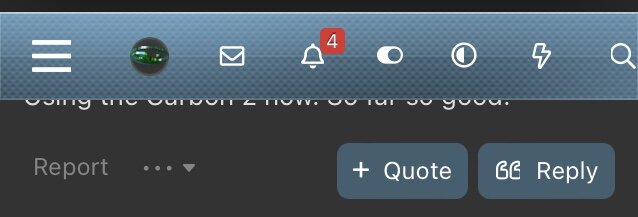
Isn’t that the lighting bolt on the top left? Takes me to the Home page.

Edit: It’s actually the What’s new or latest page which is what I get when on the Home page for Mobile.

IMG_9907.jpeg
 
Isn’t that the lighting bolt on the top left? Takes me to the Home page.

Edit: It’s actually the What’s new or latest page which is what I get when on the Home page for Mobile.

View attachment 129326

i'm going to get back on the carbon here soon.. been on illuminate for a couple days tweaking that one. i like the sticky or floating header better on that one. i had always liked and used the illuminate dark that SweetLeafGrow designed and build back in the day. i really liked the look and layout of it. i'm not SLG so i can't make this new one look exactly the same. i mostly view the forum on a 40" curved monitor so having the option of a fluid width on the new themes are a complete game changer for me personally so i will get used to the new ones quick.

i'll look into that lightening bolt man, it very well may be an option to choose what it does. these new versions are way more customizable. the old ones have maybe 20 or 30 options and these news ones have hundreds, maybe more. the two new themes have very similar settings but there are minor variances so i'll hunt for a bolt setting in the menus. just last night i went through every single setting and field in the illuminate 2 just to get comfortable with it. i remembered about 10% hahahaha nah it's all good. the biggest confusion i have so far in the settings are the amount of freakin colors and the eight million different things that you can change the color of. and it lays it out with light and dark modes on the same screens.. man it's a lot of color charts and stuff... pages and pages!!! took me an hour i bet just to figure out how to make the I2 dark green highlights!!! hahaha i exaggerate but it felt like an hour!! haha "real-feel time" hahaha

i'd like to learn one at a time and get to know them both inside and out. i really hope everybody tries to embrace one of the two new themes because honestly we are on borrowed time with the old ones. They overhauled the entire javascript framework to optimize page load speed and some things simply can't be properly merged. i tinkered with the three old ones and got all the merged templates to jive happy but they could be one small update away from not working. and they're already at sub version ten of this new 2.3 so they update often. and it will probably be a little at a time that stops working, it won't be all or nothing. some features or buttons may just stop loading down the road. i'll get errors and warnings as things have issues. for now they work, for how long i don't know???

maybe.. and just maybe we'll pick a deadline to remove the old ones.. staff and i will discuss it but maybe we'll say something like at the end of the year or something like that. maybe.. i almost deleted this line after typing it.. one thing that we are going to do is once i have both new themes working smooth we will choose one to be the new default theme that all guests and new members first see.
 
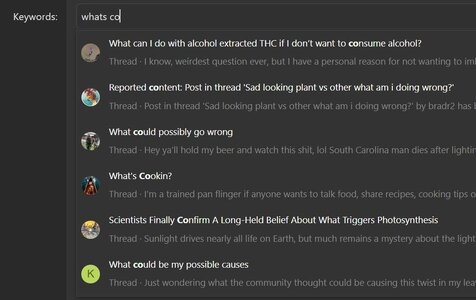
i added suggestive search so as we type, threads will display live...

Capture.JPG

i also recently increased the amount of time auto draft saves a message. it was 24hrs. it is now 48hrs. and now saves every 30 seconds versus old 60 second setting.

and posts per page have been increased from 20 to 40.

images per page was also increased.

and i noticed that any new alerts that appear under the bell and in the alert page were defaulted as the exact same color from factory so i darkened up the light page and lightened the dark page ones on both styles on any new alert notification.
 
Last edited:
@Zen_seeker , the lightening bolt is the "what's new" button. it can't be changed without custom coding.

you got me back on carbon again.. i'll probably use it as my daily driver now. as a raiders fan the silver on dark theme looks pretty hot!!!!!
and the floater menu turns out isn't really important to me as much as i thought it was. i normally only really view three sorts. mostly is "new posts" and sometimes "home" and once in a while i use "find threads/your threads" just to access any thread i created. other than that i use the search.

i'm kinda running out of things to fix and that i don't see any errors or problems so if you or anybody notices anything at all no matter how big or tiny let me know.. i cleaned up the guest page a little last night as far as Steam and i, we feel it's good to go.
 
@Zen_seeker , the lightening bolt is the "what's new" button. it can't be changed without custom coding.
It’s fine for me and acts like the home or old logo link to home.

you got me back on carbon again.. i'll probably use it as my daily driver now. as a raiders fan the silver on dark theme looks pretty hot!!!!!
and the floater menu turns out isn't really important to me as much as i thought it was. i normally only really view three sorts. mostly is "new posts" and sometimes "home" and once in a while i use "find threads/your threads" just to access any thread i created. other than that i use the search.
I’m liking it more as I use it. With the lightning bolt it’s got what I need for now. I’d change the colour of the title bar from blue/turquoise to a gunmetal grey or something but other features might change with it depending on how colours are applied.

Do you tweak the code at all or just go through the interface? I always copied the current page as backup and then hacked the code to make the changes I wanted directly. But that was for a BBS application about 30+ years ago. They might not leave you open code to change these days.

i'm kinda running out of things to fix and that i don't see any errors or problems so if you or anybody notices anything at all no matter how big or tiny let me know.. i cleaned up the guest page a little last night as far as Steam and i, we feel it's good to go.

I’ve noticed a few things here/there depending on the style chosen. I also don’t know what’s been intentionally removed or changed.

The newer contest winner photo highlight is missing, but might be on hold until contests are back.

Let me post and delete a few posts in threads to test the visibility when logged out. I’ll post back here when done. (I’ll double post this as one of the tests.)
 
@Stoneyluv

I deleted a post from here and in Cannagranny’s corner then logged out. I can’t see the deleted posts anymore so can’t open them.

Did you fix it or did the update? I was wondering if it was an account issue or thread issue? Moe changed my abilities a while back to I could edit or delete things without a time limit.
 
’m liking it more as I use it. With the lightning bolt it’s got what I need for now. I’d change the colour of the title bar from blue/turquoise to a gunmetal grey or something but other features might change with it depending on how colours are applied.

Do you tweak the code at all or just go through the interface? I always copied the current page as backup and then hacked the code to make the changes I wanted directly. But that was for a BBS application about 30+ years ago. They might not leave you open code to change these days.

it's an interface but there is a spot where you can add extra code at. when i undated they tool away the pink banner that Grump had for chicken joe, i added some code in there and used the pink hex code to make it that way. in the end he changed his mind and went with the blue but i got to learn how to add it and it was a success so down the road as i get better we can add code in there for anything..

I’ve noticed a few things here/there depending on the style chosen. I also don’t know what’s been intentionally removed or changed.

i mainly only changed logo and slogan stuff, a little of the colors, i turned a few added features on as i saw them when going through the settings one by one. i wanted it to look a little different but also have similar aspects.
the biggest change was probably to the look of the site as a guest or not logged in. i changed almost everything there.

The newer contest winner photo highlight is missing, but might be on hold until contests are back.

we took that down a while back. i had made one for a while that scrolled every winner from last year but i couldn't figure out how to make every photo the same shape and size and still make them look good so i turned it off and put it on the back burner. i fumble with photoshops and anything to do with style or art. i'm a fit and function guy so thats why i have been leaning on you guys for the fancy stuff.

@Stoneyluv

I deleted a post from here and in Cannagranny’s corner then logged out. I can’t see the deleted posts anymore so can’t open them.

Did you fix it or did the update? I was wondering if it was an account issue or thread issue? Moe changed my abilities a while back to I could edit or delete things without a time limit.

yeah i fixed that the night we were chatting right after the update. it was a setting that had been wrong since the beginning of time.. it also was wrong in aquas clinic pages.. they're the only two special clubs that this particular setting was under. it was an entire quick set of settings in a batch, so easy to mess up. i just did it a few days ago with grannys profile, easy to miss one little setting. probably the only error i found so far from the previous owner.
 
it's an interface but there is a spot where you can add extra code at. when i undated they tool away the pink banner that Grump had for chicken joe, i added some code in there and used the pink hex code to make it that way. in the end he changed his mind and went with the blue but i got to learn how to add it and it was a success so down the road as i get better we can add code in there for anything..


i mainly only changed logo and slogan stuff, a little of the colors, i turned a few added features on as i saw them when going through the settings one by one. i wanted it to look a little different but also have similar aspects.
the biggest change was probably to the look of the site as a guest or not logged in. i changed almost everything there.


we took that down a while back. i had made one for a while that scrolled every winner from last year but i couldn't figure out how to make every photo the same shape and size and still make them look good so i turned it off and put it on the back burner. i fumble with photoshops and anything to do with style or art. i'm a fit and function guy so thats why i have been leaning on you guys for the fancy stuff.


yeah i fixed that the night we were chatting right after the update. it was a setting that had been wrong since the beginning of time.. it also was wrong in aquas clinic pages.. they're the only two special clubs that this particular setting was under. it was an entire quick set of settings in a batch, so easy to mess up. i just did it a few days ago with grannys profile, easy to miss one little setting. probably the only error i found so far from the previous owner.
You’re doing great so far. I find sink or swim on non life threatening things can be a great motivator. What’s the worst that can happen, right? 🤣

I’ll keep an eye out for things. Let me know what skins/themes you want checked besides Carbon 2.
 
You’re doing great so far. I find sink or swim on non life threatening things can be a great motivator. What’s the worst that can happen, right? 🤣

I’ll keep an eye out for things. Let me know what skins/themes you want checked besides Carbon 2.

thanks a lot man, i've enjoyed it and will continue to get better. i've changed a couple things that i didn't understand and went eh lets see what happens!!! nope turn that back off!!! hahaha

.

so just to full circle the deleted issue that message that you posted and deleted on the corner i went in and permanently deleted it. so when you get a chance please check and see if it totally disappeared for you? and the one on this thread should still be visible to you, but deleted to others not able to see it. there are a small handful of you that have those special permissions, they're all in a special group and easy to find/change. 99% is to delete just like you.
 
Back
Top Bottom