
Bud Builders - Making Friends, Growing Cannabis

Register a free account today to become a Bud Builders member! Once signed in, you'll be able to participate on our site by adding your own topics and posts, as well as connect with other members through your own private inbox.

Join the fun and make some friends!

AC Infinity controller 67, 69 and 69 Pro

Skunky Dunk Farms

Stoned Scientist
Joined
May 11, 2023
Messages
37
Reaction score
218
Anyone running any of this gear?

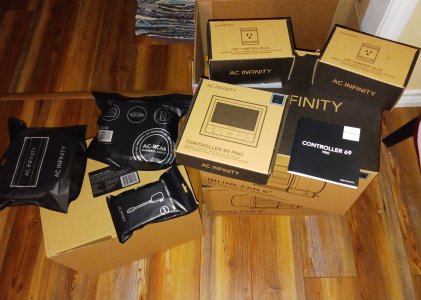
I've gathered together quite an assortment of AC Infinity gear that I'm going to try and install in my flower room as soon as this round is finished.20230416_063955.jpg
I've been running a Controller 67 with there 6" inline and am very happy with output and sound levels.
But, the flower room will be a bit more involved with the Controller 69 Pro with wifi.
First obstacle was the Controller won't work with a 5g router so i got a dedicated 2.4 g router and setup a seperate network.
Next, I've got 3 of there ac outlet UIS adapters to plug my lights into for the Controller to operate as timers.
I've also got 3 of there 2 to 1 adapter dongles as I'll be running 2 of there 6" UIS inlines for exhaust daisy chained.
Then I have 3 type A lighting adapters to replace the rheostats for UIS controlled lighting and dimming on 3 meanwell drivers on my 244 qb's.
I've also got 4 tybe B lighting adapters to try and use with my 4 Sun Systems CMH 315 ballasts.
Anywho, there is that and it's goin to be a work in progress and I hope I don't cause any of the magic wire smoke to escape.
 
Im like AC products and am running several.
1. Both tents- 4x4 and 2x4
2. 8”, 6” and 4” Exhaust fans
3. 1 4” carbon filter
4. 2 69 Pro Wifi Controllers and 1 67
5. A bunch of their oscillating fans

The 69 pro controllers were a game changer for me. I travel a lot, and being able to make adjustments while out of town is priceless.
 
I've heard reports of issues with the '69 and ACI's 9" oscillator fan.....

I've been eyeing that same 69 you have @Nesta for the same reasons. Sounds like you're pretty happy with it.
 
I've heard reports of issues with the '69 and ACI's 9" oscillator fan.....

I've been eyeing that same 69 you have @Nesta for the same reasons. Sounds like you're pretty happy with it.
I really dont mess with the oscillating fan setup much. To be honest they are pretty much on all the time, as i like air movement. Where I play with the controls much more so is the exhaust fans. I’ve had to reset the controllers a few times, but nothing major.
 
I really dont mess with the oscillating fan setup much. To be honest they are pretty much on all the time, as i like air movement. Where I play with the controls much more so is the exhaust fans. I’ve had to reset the controllers a few times, but nothing major.
Same here. I don't have my fans tying up controller outputs, there are only 4 ports as it is. I do like the controller.69 and have 2 running now.
 
Same here. I don't have my fans tying up controller outputs, there are only 4 ports as it is. I do like the controller.69 and have 2 running now.
These,
https://acinfinity.com/hydroponics-...s-2-in-1-splitter-daisy-chain-adapter-dongle/
Help expand the 69 and 69 Pro with these splitters. I have 3 of them so far for my setup and it'll allow daisy chaining of like devices.
I'll be able to run 2 exhaust inlines from a single UIS port and ill be able to daisy chain 3 of these,
daisy chained together to one UIS port to control lighting scheduling.
 
These,
https://acinfinity.com/hydroponics-...s-2-in-1-splitter-daisy-chain-adapter-dongle/
Help expand the 69 and 69 Pro with these splitters. I have 3 of them so far for my setup and it'll allow daisy chaining of like devices.
I'll be able to run 2 exhaust inlines from a single UIS port and ill be able to daisy chain 3 of these,
daisy chained together to one UIS port to control lighting scheduling.
I need to pick up some of those splitters. I know they were working on them and have seen them mentioned in their operating manuals. Nice to see they have started to actually sell them.
 
These,
https://acinfinity.com/hydroponics-...s-2-in-1-splitter-daisy-chain-adapter-dongle/
Help expand the 69 and 69 Pro with these splitters. I have 3 of them so far for my setup and it'll allow daisy chaining of like devices.
I'll be able to run 2 exhaust inlines from a single UIS port and ill be able to daisy chain 3 of these,
daisy chained together to one UIS port to control lighting scheduling.
How does the controller decipher the signal if you're running 2 fans off of one controller? Isn't there only one sensor or do each have their own sensor?
 
I currently have two tents operating. The 2x4 tent has an AC Infinity Controller 69 Pro. It's running a 6-inch inline fan, a T3 humidifier and a heater using their control plug. The tent has a no-name oscillating fan that is running constantly. When the controller works, it's great, but it tends to fail unexpectedly, and their support has never been able to help.

The 28"x28" tent has Ink Bird controllers, except I have an AC Infinity oscillating fan in the tent because it can be set to slow speeds that are best for a small tent. I am thinking about changing this tent to a Controller 69 Pro, like the larger tent.

Instead of using ports on the controller, the lights for both tents are controlled by Alexa plugs. Alexa works well for anything that runs on a schedule.
 
Last edited by a moderator:
How does the controller decipher the signal if you're running 2 fans off of one controller? Isn't there only one sensor or do each have their own sensor?
There is only one sensor per controller. It can operate multiple fans, though. That can be done by using multiple ports, but there are only four ports. They have had a port expansion dongle that can connect multiple devices to the same port, but it hasn't been available for quite a while. When using port expansion, all the devices on the dongle operate the same.
 
How does the controller decipher the signal if you're running 2 fans off of one controller? Isn't there only one sensor or do each have their own sensor?
The controller knows what UIS device type you have plugged into each control port and programming options for each port will refect that.
 
I found a cheap tower fan on amazon and will test it out to see if it was worth the $10 I paid for it. It's 36" and oscillates. With the tower I can get both top and bottom and will only need to use one fan for both. Hopefully it works as I envision it will.
 
I currently have two tents operating. The 2x4 tent has an AC Infinity Controller 69 Pro. It's running a 6-inch inline fan, a T3 humidifier and a heater using their control plug. The tent has a no-name oscillating fan that is running constantly. When the controller works, it's great, but it tends to fail unexpectedly, and their support has never been able to help.

The 28"x28" tent has Ink Bird controllers, except I have an AC Infinity oscillating fan in the tent because it can be set to slow speeds that are best for a small tent. I am thinking about changing this tent to a Controller 69 Pro, like the larger tent.

Instead of using ports on the controller, the lights for both tents are controlled by Alexa plugs. Alexa works well for anything that runs on a schedule.
I've heard a couple others mention the Controller fails unexpectedly?
Does everything shut off or does it lose its memory?
 
I've heard a couple others mention the Controller fails unexpectedly?
Does everything shut off or does it lose its memory?
Every problem I've had has been different.

Once the power went out and it lost all its settings except WiFi. I noticed the problem when the tent overheated because the exhaust fan didn't run. I had to reconfigure every setting. After that, I added a battery backup.

There was also a problem with the oscillating fan. If the fan was connected, the controller became unstable. That was fixed by a firmware update.

The most recent problem was when the WiFi stopped working for no apparent reason. I made it worse because I didn't think to check for a firmware update and deleted the configuration from my phone, only to discover I couldn't reload it. Bluetooth kept stopping while it was updating. The solution was to stop every app on my phone (a Samsung S22 Ultra) before connecting with Bluetooth to reset the WiFi. A welcome feature was that I was able to reload the configuration from the cloud.

Credit for the solutions goes to @freezeland, who generously helped me many times.
 
Every problem I've had has been different.

Once the power went out and it lost all its settings except WiFi. I noticed the problem when the tent overheated because the exhaust fan didn't run. I had to reconfigure every setting. After that, I added a battery backup.

There was also a problem with the oscillating fan. If the fan was connected, the controller became unstable. That was fixed by a firmware update.

The most recent problem was when the WiFi stopped working for no apparent reason. I made it worse because I didn't think to check for a firmware update and deleted the configuration from my phone, only to discover I couldn't reload it. Bluetooth kept stopping while it was updating. The solution was to stop every app on my phone (a Samsung S22 Ultra) before connecting with Bluetooth to reset the WiFi. A welcome feature was that I was able to reload the configuration from the cloud.

Credit for the solutions goes to @freezeland, who generously helped me many times.
I'm assuming firmware means to the controller and not an app update?

Would you say that with the issues you've had that you've resolved them with the firmware updates? I'm thinking of upgrading the T6/Cont 67 I currently have with a T8/Cont 69pro. The T6 is not pulling enough air through the tent, 5 x 5. I don't plan on using an ACI fan so I should be good to go? I like that I can monitor and control from anywhere there's an internet signal as I travel frequently.
 
I'm assuming firmware means to the controller and not an app update?

Would you say that with the issues you've had that you've resolved them with the firmware updates? I'm thinking of upgrading the T6/Cont 67 I currently have with a T8/Cont 69pro. The T6 is not pulling enough air through the tent, 5 x 5. I don't plan on using an ACI fan so I should be good to go? I like that I can monitor and control from anywhere there's an internet signal as I travel frequently.
The firmware updates have resolved the issues with occillating fans working intermediate. The only issue I have seen currently is if you have to many other apps open on your device. It eats the phone’s memory up and the wifi connection to the 69 pro gets wonky. Close everything and reopen the ac infinity app resolves it.
 
The firmware updates have resolved the issues with occillating fans working intermediate. The only issue I have seen currently is if you have to many other apps open on your device. It eats the phone’s memory up and the wifi connection to the 69 pro gets wonky. Close everything and reopen the ac infinity app resolves it.
Thanks for clarifying. Makes my purchase decision easy.
 
I'm assuming firmware means to the controller and not an app update?
Yes. The controller software, not the phone app.

Would you say that with the issues you've had that you've resolved them with the firmware updates?
The problem with the fan, yes. I'm not sure about the WiFi failure and the Bluetooth memory problem @freezeland mentioned, but there was a firmware update pending when those problems occurred. The controller has been working well since.

I'll add that I would buy another Controller 69 Pro. The system overall is pretty darn good.
 
Got the rj11 j boxes in today.
These are supposed to attach in place of the 2 wire dimmers.View attachment 4937
I noticed the light dimming levels via the C69 were @ greater increments than the knob on my light's control box. Might not apply to everyone but I had to adjust a little for it so thought I'd mention.
 
I noticed the light dimming levels via the C69 were @ greater increments than the knob on my light's control box. Might not apply to everyone but I had to adjust a little for it so thought I'd mention.
Same here, my lights only have 4 setpoints on the knob. With the controller 69 it has 10. I have checked with a watt meter & it is actually working in 10% increments.
 
Does anybody know the maximum amp load these controllers can handle?
And can they control cooling to set a day time temp and separate night time temp?

I'm basically looking for digital day/night cooling control with a 15amp load capacity. Right now what I have is analog control and I want more precision control
 
Does anybody know the maximum amp load these controllers can handle?
And can they control cooling to set a day time temp and separate night time temp?

I'm basically looking for digital day/night cooling control with a 15amp load capacity. Right now what I have is analog control and I want more precision control
You want to look at the ac infinity 75 or 79 smart temp controller or an Inkbird.
 
Does anybody know the maximum amp load these controllers can handle?
And can they control cooling to set a day time temp and separate night time temp?

I'm basically looking for digital day/night cooling control with a 15amp load capacity. Right now what I have is analog control and I want more precision control
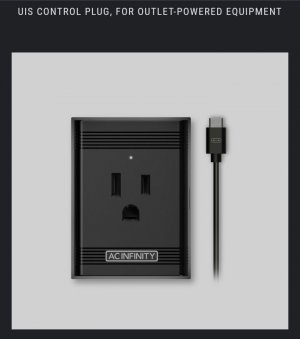
For the Controller 67 or 69 or 69 Pro this device is a controllable 15 amp outlet.https://acinfinity.com/hydroponics-growers/controllers/smart-uis-controllers/uis-control-plug-for-outlet-powered-equipment/Screenshot_20230609_083408_Samsung Internet.jpg
I've got 3 of these with the splitter dongles to run 7 lights off one UIS port
 
The AC stuff is limited to 1100 watts. 15 amps at 120volts AC is 1800 watts.
Thanks, I didn’t do the math. I just knew the 67/69 controllers won’t operate a heater or ac so recommended the 75/79 since that’s what they are for. Inkbird would be the better choice here.
 
For the Controller 67 or 69 or 69 Pro this device is a controllable 15 amp outlet.https://acinfinity.com/hydroponics-growers/controllers/smart-uis-controllers/uis-control-plug-for-outlet-powered-equipment/View attachment 6245
I've got 3 of these with the splitter dongles to run 7 lights off one UIS port
I haven’t seen that on their site yet, admittedly I haven’t looked either.
 
Thanks, I didn’t do the math. I just knew the 67/69 controllers won’t operate a heater or ac so recommended the 75/79 since that’s what they are for. Inkbird would be the better choice here.
I did not go thru the whole inkbird site but what little I found limited their stuff to 1100 watts as well. Someone above suggested using the 67/69 controller. Whst is it not good for AC or Heating?
 
I did not go thru the whole inkbird site but what little I found limited their stuff to 1100 watts as well. Someone above suggested using the 67/69 controller. Whst is it not good for AC or Heating?
The 67/69 controllers don’t have an outlet. I didn’t know they now make an outlet that integrates to those controllers through their integrated uis system. That appears to be Capable of 15amps. That according to cool beans. I haven’t looked on their site personally to look at the specs for that outlet.
 
The 67/69 controllers don’t have an outlet. I didn’t know they now make an outlet that integrates to those controllers through their integrated uis system. That appears to be Capable of 15amps. That according to cool beans. I haven’t looked on their site personally to look at the specs for that outlet.
Currently running a heater off the controller 69, granted it's set on low heat which means it's only running at 700 watts, never tried it higher than that.
 
Currently running a heater off the controller 69, granted it's set on low heat which means it's only running at 700 watts, never tried it higher than that.
That's exactly what I do using the control plug. I also run fans and a humidifier.

The Controller 69 itself doesn't use much power. It just controls UIS devices that have their own power plugs. The controller draws the little power it needs from the devices via the UIS control cables that look like long USB cables.
 
Last edited by a moderator:
Yesterday, I ordered some AC Infinity stuff for my second tent. I have been using Inkbird controllers for that tent, but I decided I wanted multiple triggers for the exhaust fan, and the Inkbird controllers can't do that.

My intent was to buy a Controller 69 Pro, and I did. But I also bought a third control plug, an S4 inline fan with duct and an S6 oscillating fan. Except for the oscillating fan, this equipment will be added to my smaller tent (28"x28"x63").

I've been having a tough time keeping the temperature in range, so the RH has been running low, as well. I'm not sure why, but I think it might have to do with the volume and/or the shape of the tent. We'll see if these components work better.

PS: I searched for a discount code and found one for 10% off that worked.
 
One thing I want to add regarding the 69 series is after using it I wish I had gone with the Pro version. The regular model doesn't allow for any buffering. So when you set the temp at 70 it comes on at 70.0 & turns off at 69.9. There's no way to change this that I've been able to find. Whereas with the Pro you can supposedly set different cut in & cut out setpoints to force it to run a bit longer.

I haven't found it to cause huge issues with the heater or humidifier, there seems to be enough of a lag between the devices being switched on & the heat/humidity actually coming out that it doesn't seem to cause insanely short runs. I'd still like to be able to widen it out, but it's ok. However the exhaust fan, especially since I installed an inline booster fan set to run constant will come on & run for like a second. To the point at times the motor wouldn't even get up to full speed before it shuts back off. Which then doesn't drop the RH very far below setpoint so in just a few seconds & comes back on for a second again.

I was able to rig around it by creating my own plug in time delay relay so that the fan will only come on after a constant signal for a settable period of time. However I just wanted to point that out, because I wish I had realized that when I bought mine.
 
One thing I want to add regarding the 69 series is after using it I wish I had gone with the Pro version. The regular model doesn't allow for any buffering. So when you set the temp at 70 it comes on at 70.0 & turns off at 69.9. There's no way to change this that I've been able to find. Whereas with the Pro you can supposedly set different cut in & cut out setpoints to force it to run a bit longer.

I haven't found it to cause huge issues with the heater or humidifier, there seems to be enough of a lag between the devices being switched on & the heat/humidity actually coming out that it doesn't seem to cause insanely short runs. I'd still like to be able to widen it out, but it's ok. However the exhaust fan, especially since I installed an inline booster fan set to run constant will come on & run for like a second. To the point at times the motor wouldn't even get up to full speed before it shuts back off. Which then doesn't drop the RH very far below setpoint so in just a few seconds & comes back on for a second again.

I was able to rig around it by creating my own plug in time delay relay so that the fan will only come on after a constant signal for a settable period of time. However I just wanted to point that out, because I wish I had realized that when I bought mine.
On my controller 67 app, If I go to settings/port there is a transition setting for temperature and humidity for auto mode.
 
On my controller 67 app, If I go to settings/port there is a transition setting for temperature and humidity for auto mode.
I've seen that but never tried to use it. From my reading of the tooltip, how that works is that it will ramp up in levels as the temp/rh goes over setpoint. So it would start at 1 then at 1 degree over ramp up to 2 and so on. Problem is controlling the smart plug it's either on or off, all levels are treated as on. So changing the fan speed from 1 to 2 effectively does nothing that I can tell. Unless I'm understanding it wrong.
 
Back
Top Bottom