Bud Builders - Making Friends, Growing Cannabis

Register a free account today to become a Bud Builders member! Once signed in, you'll be able to participate on our site by adding your own topics and posts, as well as connect with other members through your own private inbox.

Join the fun and make some friends!

AC Infinity controller 67, 69 and 69 Pro

I've seen that but never tried to use it. From my reading of the tooltip, how that works is that it will ramp up in levels as the temp/rh goes over setpoint. So it would start at 1 then at 1 degree over ramp up to 2 and so on. Problem is controlling the smart plug it's either on or off, all levels are treated as on. So changing the fan speed from 1 to 2 effectively does nothing that I can tell. Unless I'm understanding it wrong.
Not sure with the UIS plugs.
 
Not sure with the UIS plugs.
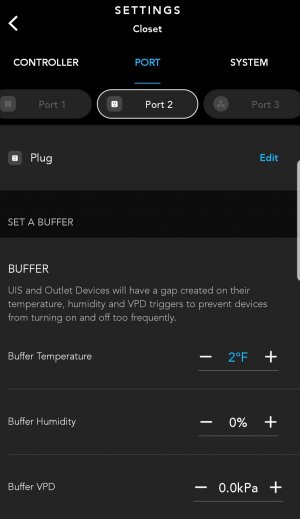
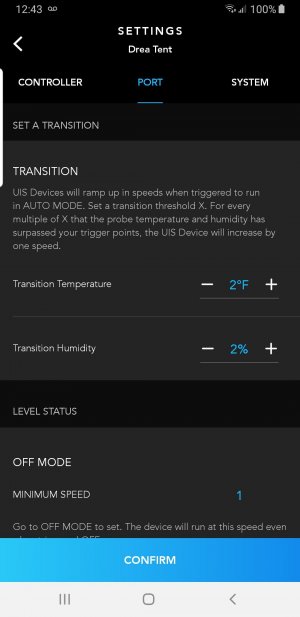
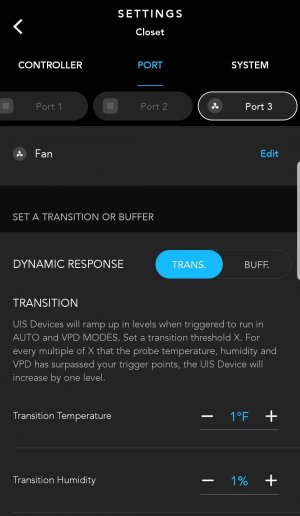
For the control plug, only the buffer option is available. It has an on/off range plus and minus the set value that keeps the plug from powering on and off too often. For UIS devices, like an inline fan, there is also a transition option that ramps up the speed of the device. The transition option won't show when a control plug is attached to the port.
 
Last edited by a moderator:
One thing I want to add regarding the 69 series is after using it I wish I had gone with the Pro version. The regular model doesn't allow for any buffering. So when you set the temp at 70 it comes on at 70.0 & turns off at 69.9. There's no way to change this that I've been able to find. Whereas with the Pro you can supposedly set different cut in & cut out setpoints to force it to run a bit longer.

I haven't found it to cause huge issues with the heater or humidifier, there seems to be enough of a lag between the devices being switched on & the heat/humidity actually coming out that it doesn't seem to cause insanely short runs. I'd still like to be able to widen it out, but it's ok. However the exhaust fan, especially since I installed an inline booster fan set to run constant will come on & run for like a second. To the point at times the motor wouldn't even get up to full speed before it shuts back off. Which then doesn't drop the RH very far below setpoint so in just a few seconds & comes back on for a second again.

I was able to rig around it by creating my own plug in time delay relay so that the fan will only come on after a constant signal for a settable period of time. However I just wanted to point that out, because I wish I had realized that when I bought mine.
A couple of things that might be of help now or in the future.
#1. Take a look thru the programing of the controller and see if it has a deadband. That is typically the tern used for what you are trying to do.
#2. If you are setting your dehumidifier with a zero deadband you are going to smoke it pretty quick. They need a period of cool down after each time it turns on to allow for a cool down process.
 
Last edited:
A couple of things that might be of help know or in the future.
#1. Take a look thru the programing of the controller and see if it has a deadband. That is typically the tern used for what you are trying to do.
#2. If you are setting your dehumidifier with a zero deadband you are going to smoke it pretty quick. They need a period of cool down after each time it turns on to allow for a cool down process.
Yeah I'm pretty sure it's not available in this controller. I found the description of the feature on AC infinity's website, they call it a buffer & it's only available on the pro version of the controller.

Fortunately it's running the exhaust to vent out humidity, but I don't imagine it's great for a fan either. However you're 100% right if that had been hooked to any kind of dehumidifier or AC unit it could easily have killed it.
 
Yeah I'm pretty sure it's not available in this controller. I found the description of the feature on AC infinity's website, they call it a buffer & it's only available on the pro version of the controller.

Fortunately it's running the exhaust to vent out humidity, but I don't imagine it's great for a fan either. However you're 100% right if that had been hooked to any kind of dehumidifier or AC unit it could easily have killed it.
Sorry man I am not familiar with their line of controls. Controller are helpful but they all have their issues. Some you have to buy add on modules to do other things. It just depends on the brand.
 
Sorry man I am not familiar with their line of controls. Controller are helpful but they all have their issues. Some you have to buy add on modules to do other things. It just depends on the brand.
No worries I managed to build my own module to work around it, I just wanted to make others aware, if you're planning on using the smart outlets the Pro version works a lot better.
 
No worries I managed to build my own module to work around it, I just wanted to make others aware, if you're planning on using the smart outlets the Pro version works a lot better.
I bought the pro version for the WiFi, and didn't think about other feature differences. That makes sense, though.

I had a problem with my tent heater switching on and off constantly. This conversation helped me tweak the settings. I set the buffer to degrees F.
 
I bought the pro version for the WiFi, and didn't think about other feature differences. That makes sense, though.

I had a problem with my tent heater switching on and off constantly. This conversation helped me tweak the settings. I set the buffer to degrees F.
What is this buffer called in the device settings?
 
What made the Controller 69 hard for me to learn was how options are contextualized. So, the views change depending on what port is selected, for example. I believe they chose this design because they had to make compromises for the small screen on a phone. I would like them to make a web browser app, too, but I doubt they will. Phones probably have a richer development environment. I have SensorPush sensors in my tents and my lung room because they have apps for both the phone and the browser. (They don't make controllers.) I have trouble using phone apps because I have trouble seeing the small print sizes.

Here's a pic of the SensorPush web browser display:

1686958064299.png
 
While I was configuring a new 69 Pro and installing the latest update, I noticed that the release notes said something about support for gradual sunrise and sunset. I don't recall exactly what it said, but that was the meaning I got from it. I'm looking but haven't found a better description. I don't have a compatible light, so I can't try it. I found an AC Infinity web page that shows compatibility with other brand lights. Apparently, they support two protocols for the RJ11/12 jacks. One is the PWM protocol and the other is the resistor protocol. I don't plan to buy a new light so I could try it, but it's tempting. I have been thinking that the light in my 2x2 tent is too powerful, though. Hmmm...

 
While I was configuring a new 69 Pro and installing the latest update, I noticed that the release notes said something about support for gradual sunrise and sunset. I don't recall exactly what it said, but that was the meaning I got from it. I'm looking but haven't found a better description. I don't have a compatible light, so I can't try it. I found an AC Infinity web page that shows compatibility with other brand lights. Apparently, they support two protocols for the RJ11/12 jacks. One is the PWM protocol and the other is the resistor protocol. I don't plan to buy a new light so I could try it, but it's tempting. I have been thinking that the light in my 2x2 tent is too powerful, though. Hmmm...

I believe that sunrise/sunset is supported with their ion board transition light line of lights.
 
I believe that sunrise/sunset is supported with their ion board transition light line of lights.
It is, but according to their web page, other manufacturer's lights are also supported. The ViparSpectra KS5000 is on the list. It supposedly has a Type-A protocol jack. I'm wondering if the XS1500 Pro might also work, even though it's not on the list, because I'm not sure the list is up to date. There are also a bunch of Spider Farmer lights that support either the Type-A or Type-B protocol. Apparently, these protocols are industry standard (or close to it).
 
It is, but according to their web page, other manufacturer's lights are also supported. The ViparSpectra KS5000 is on the list. It supposedly has a Type-A protocol jack. I'm wondering if the XS1500 Pro might also work, even though it's not on the list, because I'm not sure the list is up to date. There are also a bunch of Spider Farmer lights that support either the Type-A or Type-B protocol. Apparently, these protocols are industry standard (or close to it).
I'm in the middle of this 69 Pro install debacle.
From what I can gather, with the appropriate A or B adapter any ballast that has dimming capabilities can be cobbled together to work.
The surise/sunset, I believe, is simply a dimming sequence that is digitally controlled to "create that effect.
I've got 6 244 qb's that use Meanwell's with resister pot. I think they'll use the type A adapter.
Then I have 4 Sun System CMH digital ballast's that uses their own controller thru a 2 wire pin plug cord so I'm gonna try the type B adapters for those.
Hopefully I don't let the magic smoke out lol.
 
I received a reply from ViparSpectra support about whether their XS1500 Pro light is compatible with AC Infinity's Controller 69 or 69 Pro. It sounds like it is compatible with the Type-A dongle. There is a caveat, however. The light can only be dimmed to 5%. That means it cannot be completely turned off by the controllers. So, the light could be used, but it would need a separate timer to turn it on and off.
 
I received a reply from ViparSpectra support about whether their XS1500 Pro light is compatible with AC Infinity's Controller 69 or 69 Pro. It sounds like it is compatible with the Type-A dongle. There is a caveat, however. The light can only be dimmed to 5%. That means it cannot be completely turned off by the controllers. So, the light could be used, but it would need a separate timer to turn it on and off.
Thanks! Good info for us VS owners.
 
I received a reply from ViparSpectra support about whether their XS1500 Pro light is compatible with AC Infinity's Controller 69 or 69 Pro. It sounds like it is compatible with the Type-A dongle. There is a caveat, however. The light can only be dimmed to 5%. That means it cannot be completely turned off by the controllers. So, the light could be used, but it would need a separate timer to turn it on and off.
I used a different version of Vipar light & had the same result. Worked perfectly until it was time to power the light off & it would just stay on at it's lowest setting. Which lets be real, if it won't turn all the way off there's no way to actually use it with the control/type A dongle, so they shouldn't call it compatible.
 
I used a different version of Vipar light & had the same result. Worked perfectly until it was time to power the light off & it would just stay on at it's lowest setting. Which lets be real, if it won't turn all the way off there's no way to actually use it with the control/type A dongle, so they shouldn't call it compatible.
Neither ViparSpectra nor AC Infinity claimed compatibility for the XS1500 Pro. AC Infinity's web site only says the KS5000 is compatible. It doesn't mention the XS1500 Pro, and that's why I asked about it. I didn't ask ViparSpectra about the KS5000 or any of their other lights.

Here's what AC Infinity has to say about dimming protocols:
TYPE-A (PWM AND 0-10V PROTOCOL)
The Type-A dongle is compatible with grow lights that use pulse-width modulation (PWM) or the 0-10V protocol to dim and control lighting. Even within the same protocol, light manufacturers often use different variations which results in limited dimming levels. Some fixtures may have a minimum voltage of 1V or greater, which will result in variable dimming levels that may not be as precise as those with full 0-10V voltage. This may result in the light not turning on until its set to a higher brightness level from the controller.
TYPE-B (RESISTOR PROTOCOL)
The Type-B dongle will adapt grow lights that are resistor-controlled, using analog dimming to control lighting. Analog dimming adjusts the average continuous LED current to set light intensity levels. This adapter is currently in development. Please check back for more information.

The XS1500 Pro uses the PWM protocol, so in that way it is compatible. It doesn't go all the way to zero volts, however, so in that way it is not compatible. The light's lowest setting is 5%. That's why the controller can't turn the light off. The light is the problem, not the controller.

I use ViparSpectra XS2000 lights and I like them. I don't like how the dimmer operation was changed for the XS1500 Pro. Its knob only has 5 stops: 5, 25, 50, 75 & 100 percent. I want more control than that. It also seems silly not to be able to turn the light off with a switch.

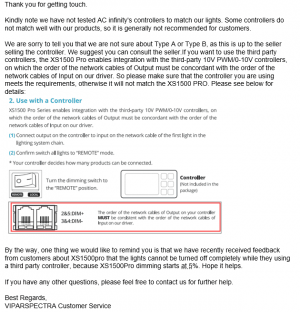
ViparSpectra is apparently aware of the issue. Their customer support informed me of the problem (near the bottom of their reply).

Here's a screenshot of their reply:

1687991374292.png
 
Neither ViparSpectra nor AC Infinity claimed compatibility for the XS1500 Pro. AC Infinity's web site only says the KS5000 is compatible. It doesn't mention the XS1500 Pro, and that's why I asked about it. I didn't ask ViparSpectra about the KS5000 or any of their other lights.

Here's what AC Infinity has to say about dimming protocols:


The XS1500 Pro uses the PWM protocol, so in that way it is compatible. It doesn't go all the way to zero volts, however, so in that way it is not compatible. The light's lowest setting is 5%. That's why the controller can't turn the light off. The light is the problem, not the controller.

I use ViparSpectra XS2000 lights and I like them. I don't like how the dimmer operation was changed for the XS1500 Pro. Its knob only has 5 stops: 5, 25, 50, 75 & 100 percent. I want more control than that. It also seems silly not to be able to turn the light off with a switch.

ViparSpectra is apparently aware of the issue. Their customer support informed me of the problem (near the bottom of their reply).

Here's a screenshot of their reply:

View attachment 10556

I get that they don't promote them working with the controller. However in that response they tell you "the XS1500PRO enables integration with the third party 10V PWM/0-10 controllers, posts an image of what I can only assume is the manual agreeing that it does work, only to follow up with ""the lights can't be turned off completely when using a third party controller"

I'm sorry the last sentence makes the one before it invalid. If it doesn't turn off it isn't compatible IMO. Their reps shouldn't be claiming they are & it definitely shouldn't be in the manual.
 
I'm sorry the last sentence makes the one before it invalid. If it doesn't turn off it isn't compatible IMO. Their reps shouldn't be claiming they are & it definitely shouldn't be in the manual.
You're right. I just provided some more information.
 
Question for Y'all. Today is my first day getting into this UIS Ecosystem and my mind is on fire with possibilities.

Regarding the sold out splitter....Will taking the male plug off a Molex to UIS connector and splicing it with two female leads from the UIS to Molex connector pretty much be the DIY hack on getting a splitter right now?
 
Regarding the sold out splitter....Will taking the male plug off a Molex to UIS connector and splicing it with two female leads from the UIS to Molex connector pretty much be the DIY hack on getting a splitter right now?
I'm going to guess there could be a configuration problem. The UIS cable conveys information between the device(s) and the controller. It probably wouldn't get correct information via the spliced connection (because Molex connections are dumb). It's hard to guess what problems that might create, if any. At a minimum, the fans wouldn't be controllable, which would defeat the reason for having a dongle.
 
Heads up on the wifi fix if you get 5G or already have 5G

Since this thing only runs on 2.4ghz you'll need to go to your router and wifi settings and open up some 2.4ghz channels for it to work otherwise your stuck with bluetooth.
Mine should've had open channels since it was set for automatic but I think my 5G over rides it so I had to open the channels manually.
I'm using Google Fiber so results may vary as not all ISP have both 2.4 and 5g settings, just one or the other.

Recent upgrade on internet gear and speed had me find this out the hard way. But it did give me the chance to set up a slow & low data wifi hotspot just for the controller 🙃
 
Im like AC products and am running several.
1. Both tents- 4x4 and 2x4
2. 8”, 6” and 4” Exhaust fans
3. 1 4” carbon filter
4. 2 69 Pro Wifi Controllers and 1 67
5. A bunch of their oscillating fans

The 69 pro controllers were a game changer for me. I travel a lot, and being able to make adjustments while out of town is priceless.
I just purchased 69 pro to pair with my lights and fans. I am having issues, it will not show ports 1 and 2 in app. Any ideas??
 
I just purchased 69 pro to pair with my lights and fans. I am having issues, it will not show ports 1 and 2 in app. Any ideas??
I just hooked mine up and set the light schedule.

Are you on the latest version of the app? Any pics of what’s plugged in?
 
Back
Top Bottom